About
The MSI Server is a Linux server that is used for development and production. It is configured with Ubuntu 22.04.05 LTS.
Contents
Configuration and properties
- 32GB RAM
- 4TB storage (2TB data0) + (2TB Ubuntu)
- Ubuntu 22.04.05
- 12GB NVIDIA RTX 4070 GPU
Configuration
The MSI Server is configured differently for Windows and Ubuntu. Please refer the appropriate section for your use case.
Ubuntu
Connecting to the MSI server
Follow the instructions in the Use VSCode to SSH in Remote Systems | GQC Dev Documentation document
Development environment
GQC uses pytorch and fastai for building its neural networks and other ML models. The msi-server-ubuntu is configured with Mambaforge which uses conda as it's environment manager. The environment was setup from a lecture of Jeremy Howard.
::danger We don't use Mambaforge or conda anymore. Refer to virtualenvwrapper docs instead.
Various aliases are configured inside .bash_aliases so that dealing with conda commands becomes easy.
| alias | description |
|---|---|
cals | list all available conda environments |
ca | shorcut to activate a conda environment |
Envs to use for different projects
| project | env-to-use |
|---|---|
| cctv-apps | pytorch |
| ai3-hackathon | ai3 |
| nbs built for CCTV processing | pytorch |
| any deep learning project | pytorch |
| gqc-utility-notebooks | gqc_utility |
Useful tips
Here are some simple bash functions that come in handy in a lot of cases
count "path-to-the-folder"        # To see the count of all unique file extensions in the current directory
du -sh "path-to-the-folder"     # check size of the folder/file
loop 5 nvidia-smi                         # loop the command nvidia-smi every 5 seconds
loop1 nvidia-smi                            # loop the command nvidia-smi every 5 seconds
- Because multiple people can SSH into MSI and run multiple tasks at the same time, it can cause resource deadlock. Meaning, one process that was started before others is prone to use all the resources leading to other processes waiting for them in queue.
- In order to avoid this scenario, we have created a Teams channel called
MSI Runs. Here, we can check if anyone strated a job before us or if we are doing it, we need to update it in the channel.
Troubleshooting notes
Cleaning up artifacts from mounted external drives
The scenario is as following. The external drive mount directory,
/media/gqc/, contains artifacts which are not needed.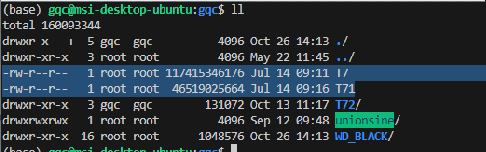
We clean them up by first unmounting the corresponding real drive for safety and finally mounting that back.
sudo umount /media/gqc/T72
sudo rm T7 T71
sudo mount /dev/sda1 /media/gqc/T7
Verify the disks by running
df -h